Chapter Two: CSS Selectors
There are three ways you can use CSS to manipulate HTML elements. Element selector, id selector, and class selector are the three ways you can target the HTML element. Element selector focus on all elements, therefore all elements with similar name will have all the attributes of the element selector. Id selector uses the id attribute which can only be used once as a selector and will only target one spot. The class selector is like the id selector therefore it can be used as many times as you want.
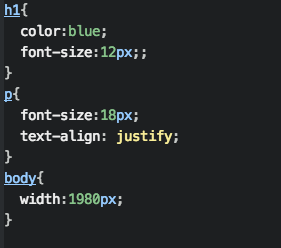
Element Selector
The element selector starts with the name of the element you want to alter and then an opening and closing curly brackets. Inside the curly brackets contains all the attribute syntax.
Id Selector
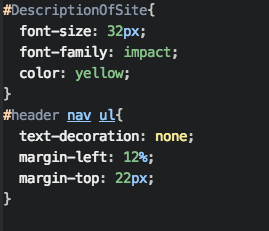
The id selector starts with the # and then the name of the id. After that, it will have the opening and closing curly brackets. Inside the curly brackets contains all the attribute syntax.
You can also add element selectors after the name of the id selector to target deeper elements.
Class Selector
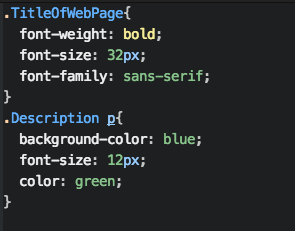
The class selector starts with the . and then the name of the class. After that, it will have the opening and closing curly brackets. Inside the curly brackets contains all the attribute syntax.
You can also add element selectors after the name of the id selector to target deeper elements.