Chapter Two: Basic Elements
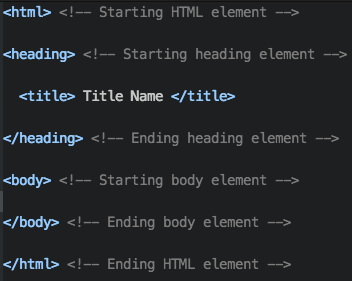
HTML is coded and constructed by element tags that give content to the web browser. Element tags have angle brackets with the name of the element. An example of an element is <title>.
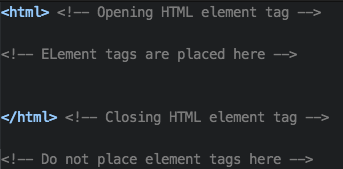
In HTML, there is always an opening element tag and a closing element tag. The opening element tag starts the function of the element. It is important to have a closing element tag for every opening element tag, because the function will not stop until you have close the opening element tag.
HTML element
The HTML element tag is the core element tag for HTML. It sets the tone for the web browser and notify the web browser that this file is a HTML file. Element tags must go inside the the HTML element tag to ensure that they are seen as HTML code.
Heading Element
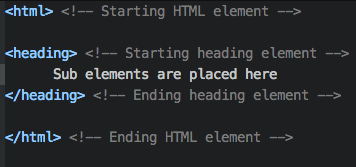
The heading element is one of the main elements inside the core element HTML and it gives a description of the HTML file. The content contains other elements like the title element. There are other elements called sub-elements that go inside the Heading element but we will get to that later.
Title Element
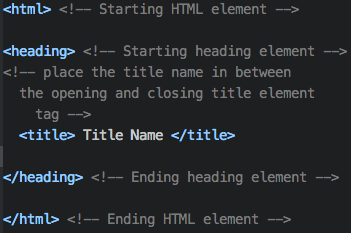
The title element is a sub-element that goes between the heading elements because it is a description of the HTML page. It does not necessarily need to be inside but it is best to be put inside the heading element for a descriptive reason. The title element influences the html web browser page name.
Body Element
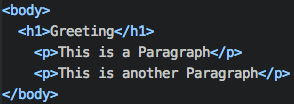
The body element is the second main element in HTML that display text content to the web browser. In the body element, it will contain all your work and code.
H1 to H6 Element
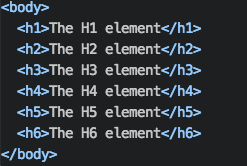
The H1 to H6 elements are titles for the text. They are big and bold however they are mainly used as a heading for a text document. It is recommanded that you do not use the H1 to h6 element as a large bold text because you can always use CSS to do that.
P Element
The P tag creates a paragraph section. In between the starting and ending of the p element, you can type any text and it will display on the web browser in a paragraph.