Chapter Three: Styling
HTML styling allows programmers to style the text to make it look more attracting. It is similar to CSS (Cascade Style Sheet) however its more into hardcoding into HTML. HTML styling is more into hard-coding into html, which is more time consuming to do than CSS however it is still useful styling documents.
This chapter will not focus too much into styling because CSS is more effective in styling your web page. It is still useful reading material to understand HTML styling as it might help you later on.
Bold Style
The bold style element will change any text inside the element into a bold text. This is useful if you are planning to make large bold titles or making some text bold in your documents.
Strong Style
The Strong element can also be used to make text bold however it is mostly used for highlighting keywords in documents.

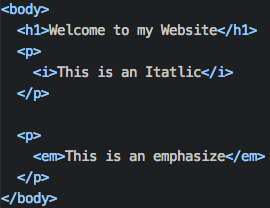
Italics Style
The italics style element will change any text inside the element into an italics text. You can use this on text documents to make certain words italics or sentences.
Emphasize style
Similar to the strong element, emphasize is another way to create italics into your sentences.
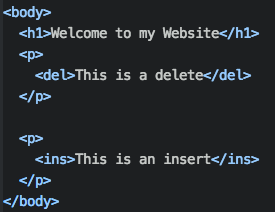
Delete Style
The delete style element does not actually delete the text but crosses out the text.
Insert Style
The insert style element underlines the text.
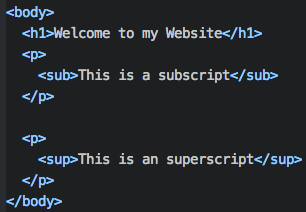
Subscript Style
The subscript style element creates a tiny text starting at the bottom.
Example: I am a subscript
Superscript Style
The superscript style element creates a tiny text starting at the top.
Example: I am a superscript